
Accessing Controlled Data in CGC with RAS
Guidance for accessing controlled data after December 15, 2026, using the new Researcher Auth Service (RAS).
Controlled-data access on CGC: What is changing?
For a consistent NIH authentication and authorization framework to access controlled- and open NIH data, the NCI Cancer Research Data Commons is moving CGC powered by Seven Bridges to a full integration with the NIH Researcher Auth Service (RAS). CGC will connect to RAS for the user login and obtain the RAS authorization information needed for downstream data access.
In practical terms, this means you will need to change the way you log into CGC to access controlled datasets.
After December 15, 2026 ("go-live"), an eRA Commons username + password login is insufficient for controlled-data access on the CGC platformTo access controlled data will require authentication (i.e., CGC login) that meets the required identity assurance level (IAL2, after December 14, 2026) before access can be granted. An eRA Commons username and password by itself is an IAL1 identity in RAS and is not an approved direct login method for a Controlled-Access Data Repository (CADR) requiring IAL2.
What is IAL2 identity-verified authentication?
IAL2 is an identity-proofing level defined in federal digital identity guidance. In practical terms, it means the identity used for controlled-data access has been verified against real-world evidence rather than relying only on self-asserted account information. RAS can detect whether the identity presented to a controlled-access repository meets the configured assurance requirement and can direct the user to complete additional proofing when needed. Where needed, users can link an eRA identity to an IAL2 identity in RAS so that RAS can associate the user with relevant eRA/dbGaP information.
How to prepare for a smooth transition to the new login system
Before CGC moves to the new RAS login experience, you should prepare the identity you will use for controlled-access data (login.gov or ID.me). Completing this work before go-live will reduce the chance of an access interruption.
For uninterrupted data access, complete steps 1-3 before December 15, 2026Doing these ahead of time is the best way to ensure a quick transition to the new system. After go-live, you will login with RAS. On your first login, you will be prompted to verify your identity for your login.gov or ID.me .
1. Create or update an identity account (login.gov or ID.me)
Choosing your identity account: login.gov versus ID.meUsers with a US passport/driver’s license and US Social Security number (SS#) should use login.gov as their CGC login. International users should use ID.me.
Your identity login needs to use a work/institutional email
Because no free email accounts such as Gmail, Yahoo, etc. can be used for CADR access, you will need to create a separate login.gov account with your institution email or add your institutional email to your ID.me account as the primary/default email.
login.gov flow (US researchers only)
Create a new account with your institutional email at login.gov. Note that if you already have a login.gov account with a personal email, you should create a separate account.
See How do I create a Login.gov account | Login.gov for step-by-step instructions.
ID.me flow (non-US researchers)
Create a new account with your work email or add your institutional email to an existing account. You can only have one ID,.me account.
See Create your ID.me Wallet – ID.me Help Center or Add a work or business email me your IDMe Wallet for step-by-step instructions.
2. Set up at least two Multi Factor Authentication methods (MFAs)
To make sure you can recover access, make sure to set up at least two Multi Factor Authentication methods for the identity provider account associated with your institutional email. Note that controlled-data access requires that MFA is in place in your login.gov or ID.me account.
- Login.gov: See Authentication methods | Login.gov
- ID.me: See Multi-factor authentication options for ID.me
3. Link your eRA Commons account (login.gov only)
Note that it is not currently possible to link your eRA Commons to an ID.me account.
For step-by-step instructions, see Transitioning To and Using Login.gov
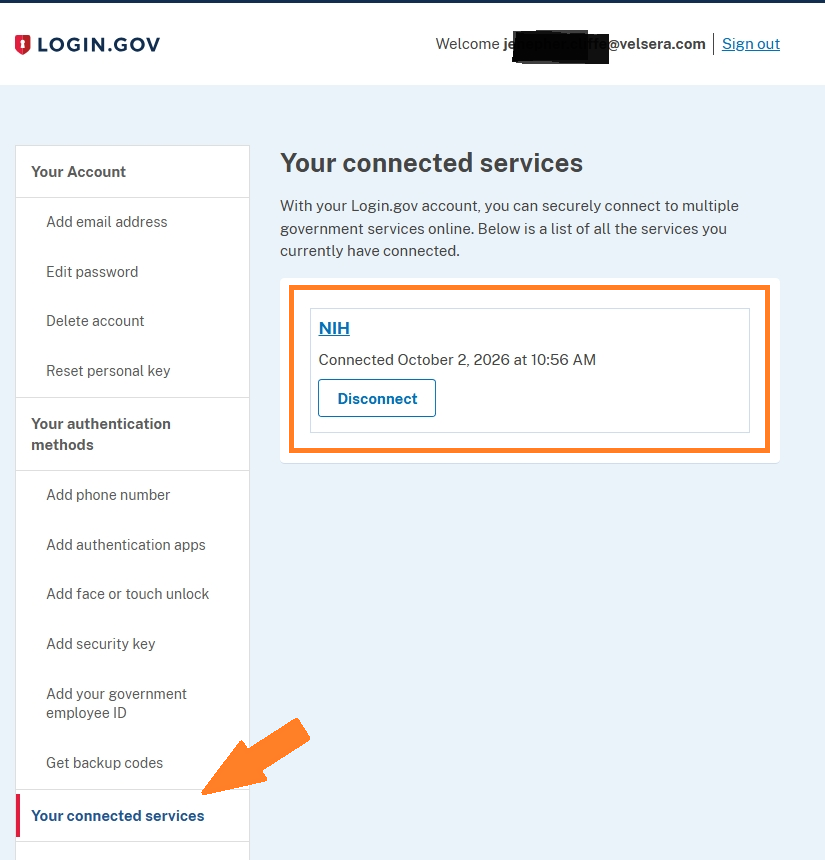
Successful Linking: Congrats, you're ready for RAS!Once complete, you should see NIH listed under Your Connected Services (see screenshot below).
Next steps (after December 15, 2026)
When the updated IAL2 login is in place, you will no longer see the “Log in with eRA Commons” option in the CGC landing page. Instead, you’ll login with your institutional login.gov or ID.me account. You’ll be prompted on your first login to verify your identity to IAL2.
Next step: Identity verification (required December 15 when RAS is live on the platform)
The first time you log in with the new system, you’ll be prompted to verify your identity with a government-issued ID such as driver’s license or passport.
You’ll follow the self-guided verification process, which should take only about 10 minutes as long as you have your documents to verify your ID and a phone.
Verifying your identity: What you'll need the first time you log into the new systemVerifying your identity requires a Government-issued ID such as driver’s license or passport and SS number (login.gov only).
For more details, ee Verify my identity | Login.gov or Identity Verification – ID.me Help Center for details on what to expect and how you can be ready the first time you log into CGC with RAS.
Can you verify your identity in advance?
Unless you absolutely need uninterrupted access to controlled data on the RAS go-live date, we strongly recommend waiting until after go-live to verify your identity. The process will be a built-in part of the CGC login flow and significantly smoother after that date.
How to verify your identity ahead of go-live (optional)
If you need to have uninterrupted access to controlled data, you can verify your RAS login ahead of time by logging into CTDC (click the "Login with RAS" button). Note that this is a workaround until the IAL2 verification process is available on CGC or eRA Commons and is not recommended for most users.
Please contact support at [email protected] for step-by-step instructions. Please include the words "verify identity for RAS ahead of go-live" in your message/subject line.
What about controlled-data access is not changing
For CRDC data access, the change replaces the legacy use of a dbGaP-derived allowlist or telemetry files for download authorization with RAS-issued GA4GH Passports and Visas (CRDC controlled-data).
The Gen3 Data Commons Framework (DCF) will continue to provide DRS-based data resolution and pre-signed URLs and will validate the RAS Passport and Visa before providing controlled-data access (except for GDC).
The underlying CRDC data identifiers and retrieval services are not being replaced by this login change. DRS and IndexD remain part of the CRDC data-access architecture. Open-access data and controlled-access data will continue to coexist in the environment; the authorization requirements differ by data type.
Updated 8 minutes ago