
About Spot/Preemptible Instances
Overview
In addition to the Standard/On-Demand instances, which are purchased at a fixed rate, the CGC also supports running task executions using cloud provider’s spare capacity. Such instances are Amazon Web Services (AWS) EC2 Spot Instances and Google Cloud Preemptible VM Instances. These are provided at a significant discount and their availability varies with general usage.
Learn how the CGC uses these instance types and how this strategy could help you reduce the cost of running your tasks.
About AWS Spot Instances
Amazon EC2 Spot Instances let you take advantage of unused EC2 capacity in the AWS cloud suitable for time-flexible workloads. They are available for all projects whose location is set to an AWS region.
With Spot instances, you pay the Spot price that's in effect for the time period your instances are running. Spot instance prices are set by Amazon EC2 and adjust gradually based on long-term trends in supply and demand for Spot instance capacity.
Spot Instances are available at up to a 90% discount compared to On-Demand prices. To compare the current Spot prices against standard On-Demand rates, visit the Spot Instance Advisor.
About GCP Preemtible VM Instances
Preemptible instances are highly affordable, short-lived compute instances suitable for time-flexible workloads. They offer the same machine types and options as regular compute instances, last for up to 24 hours and are available in all projects whose location is set to a Google Cloud region.
Pricing is fixed so you will always get low cost and financial predictability, without taking the risk of gambling on variable market pricing.
Preemptible instances are up to 80% cheaper than regular instances. To compare pricing list for standard and preemptible instances, visit Google Compute Engine Pricing.
Handling Instance Interruption
Both Spot and Preemptible instances are provided as an excess compute capacity so their availability varies with usage. The cloud provider might terminate these instances at any time if it requires access to those resources due to high demand.
The job(s) running on the instance at the time of termination will be interrupted and have to be run again from the beginning. The jobs will be restarted on an equivalent regular On-Demand instance to minimize time wasted in completing your task, unless the cause of termination is the "instance stopped responding" error. If that is the case, the jobs will be restarted on a Spot instance as well, since the cause of the error is a network or hardware malfunction, or a tool-related error, rather than Spot instance interruption.
Restarting jobs on another instance will inevitably prolong task execution time and add to the cost of running that job. The cost of re-running is greatest for long jobs that get interrupted close to completion. The possibility of interruption is why these instances are not recommended for running long, time-critical jobs.
Spot Instance:
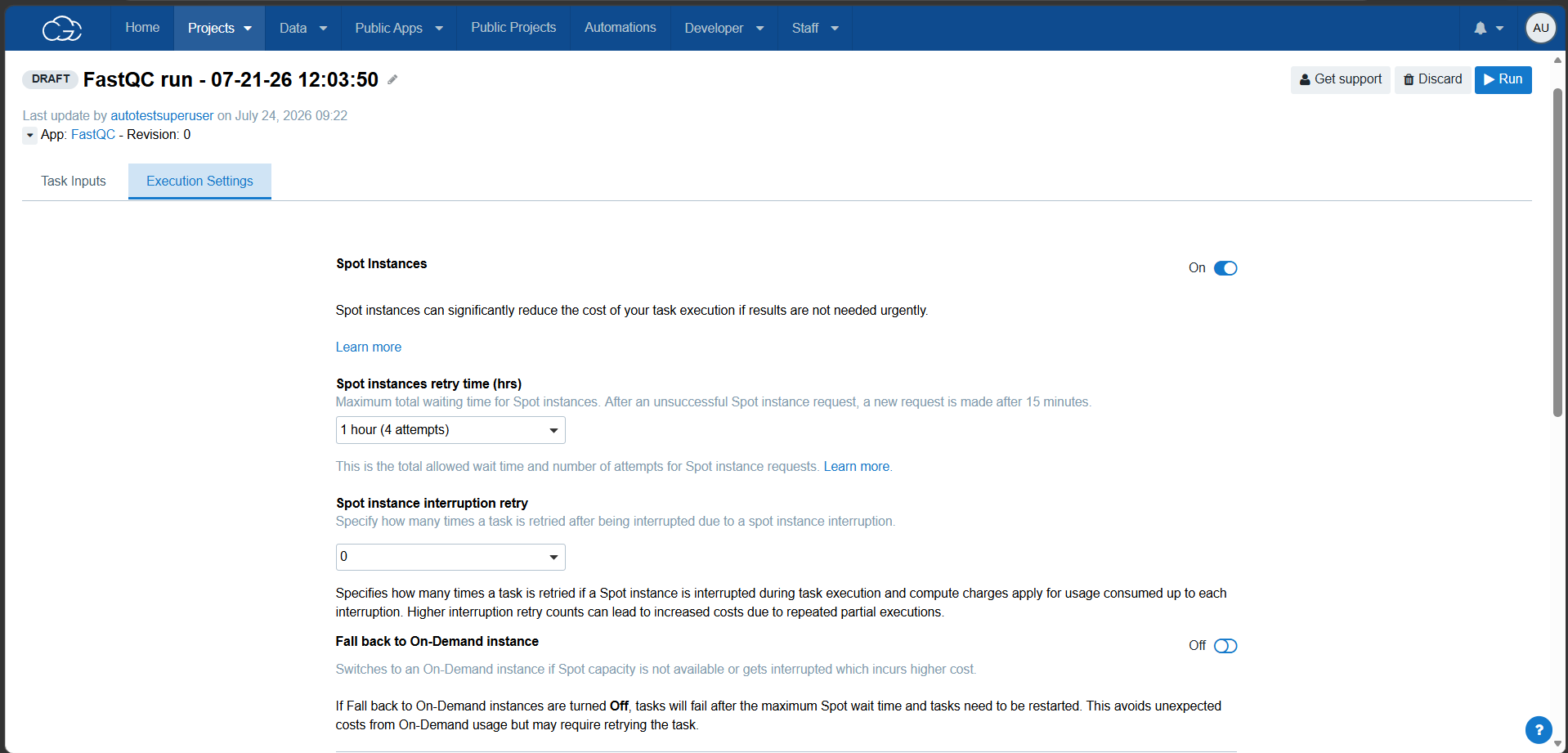
Spot instances retry time (hrs)
Specifies the maximum total waiting time and number of retry attempts for Spot instance allocation. The supported values range from 0 (default) to 12 hours.
a) Value = 0 (default):
The system will look for spot instance. If a Spot instance cannot be allocated, then the system shall determine the next action based on the value of the "Fall back to On-Demand Instance" flag:
- On: The task shall fall back to an On-Demand instance.
- Off: The task shall fail without falling back to an On-Demand instance
b) Any value other than 0 selected for the Spot instances retry time (hrs) dropdown:
- For example, if the selected value is 1 hour (4 attempts):
i. 1 hour represents the maximum total waiting time for retrying Spot instance allocation.
ii. 4 attempts represent the total number of Spot instance allocation retries within that 1-hour period. - After an initial unsuccessful Spot instance request the platform will request a spot instance allocation every 15 minutes (4 attempts per hour selected) until either
i. a spot instance is allocated
ii. the maximum total waiting time selected has been reached.
c) If a Spot instance cannot be allocated after all retry attempts (if applicable) are exhausted , the system shall determine the next action based on the value of the "Fall back to On-Demand Instance" flag:
- On: The task shall fall back to an On-Demand instance.
- Off: The task shall fail without falling back to an On-Demand instance.
Spot instance Interruption retry
Specifies how many times a spot instance allocation is retried if an allocated spot instance is interrupted during execution. Compute charges apply for the usage consumed up to each interruption. Higher interruption retry counts can lead to increased costs due to repeated partial executions. Values range between 0 (default) and 6.
a) 0: If an allocated Spot instance is interrupted by the cloud service provider for the first time, no Spot instance Interruption retry shall be performed, and the system will act depend on the value of the "Fallback to On-Demand Instance" flag.
b) Any value other than 0 selected from the Spot instance Interruption retry dropdown:
• For example, if the selected value is 2:
i) If an allocated Spot instance is interrupted by the cloud service provider for the first time, then the system shall attempt to allocate another Spot instance and shall start the task again from beginning once spot instance is allocated. This process shall continue until the configured Spot instance Interruption retry count is exhausted.
ii) Once the configured Spot instance Interruption retry count is exhausted, then the systems will act depending on the value of the "Fall back to On-Demand Instance" flag.
Fall back to On-Demand instance
Switches to an On-Demand instance if the maximum Spot instance allocation retry time or the configured Spot instance Interruption retry count is exhausted.
This option is turned On by default.
- On => If Fall back to On-Demand instance is turned ‘On’ then after an unsuccessful Spot instance allocation retry, the new retry will fall back to an On-Demand instance which incurs a higher cost a Spot Instance. An On-Demand instance will be allocated to complete the task
- Off => If Fall back to On-Demand instance is turned Off then after an unsuccessful Spot instance retry , the task will move to Failed status and needs to re-run again.
Updated 3 months ago